When I first used a sticker printer, I was amazed by how easy it was to create my own custom designs at home. I printed colorful labels for my notebooks and personalized stickers for my laptop — the results looked professional and long-lasting. It made crafting and organizing so much more fun and creative.
A sticker printer is a specialized device used to print custom stickers, labels, and decals on adhesive paper or vinyl. It’s ideal for crafting, product labeling, and branding, offering high-quality, durable prints in vibrant colors.
In this article we discuss about “Sticker Printer”
Table of Contents
Introduction:
Have you ever wanted to create your own custom stickers for your laptop, water bottle, or business packaging? That’s where a sticker printer comes in! Sticker printers make it easy to print vibrant, durable designs right from your home or office. Whether you’re a crafter, small business owner, or designer, understanding how sticker printers work can save you time and money while giving you complete creative control.
How Does a Sticker Printer Work?

A sticker printer works by transferring digital designs onto adhesive-backed paper or vinyl. Depending on the type, it may use inkjet, laser, or thermal technology. Inkjet printers spray liquid ink onto the paper, while laser printers use toner powder fused by heat. Thermal printers, often used for labels, apply heat to special paper that changes color when heated.
Types of Sticker Printers:
1. Inkjet Sticker Printers:
Inkjet printers are the most common for sticker printing. They produce high-quality, colorful results perfect for detailed artwork or photographs. Popular models include the Epson EcoTank and Canon PIXMA series.
2. Laser Sticker Printers:
Laser printers use toner instead of ink. They’re great for large-scale printing because they’re fast and cost-effective. Plus, the prints are smudge-resistant, making them ideal for professional use.
3. Thermal Sticker Printers:
Thermal printers don’t use ink or toner; instead, they rely on heat. These are perfect for barcode labels or shipping stickers but not suitable for colorful designs.
4. All-in-One Printers:
If you want versatility, an all-in-one printer that can print, scan, and copy stickers is a smart investment.
Best Sticker Printer Brands:
- Epson – Known for its EcoTank and SureColor series, offering rich colors and refillable ink tanks.
- Canon – The PIXMA line is excellent for detailed designs and photo stickers.
- HP – Offers reliable inkjet and laser models suitable for both home and business use.
- Brother – Great for label printing and small-scale sticker businesses.
- Cricut – Ideal for hobbyists who want both printing and cutting features.
Choosing the Right Sticker Printer:
When picking a sticker printer, consider these key factors:
- Print Quality: Choose printers with high DPI (dots per inch) for crisp details.
- Printing Speed: Faster printers save time for business use.
- Connectivity: Look for Wi-Fi, Bluetooth, or app-based control options.
- Media Support: Ensure your printer can handle vinyl, glossy, and matte papers.
Materials Used for Sticker Printing:
Different materials produce different finishes and durability:
- Vinyl: Waterproof and long-lasting—ideal for outdoor stickers.
- Glossy Paper: Shiny finish with vibrant colors, great for decorative stickers.
- Matte Paper: Smooth, non-reflective surface perfect for minimalist designs.
- Transparent Film: Great for clear, see-through stickers.
How to Print Stickers at Home:

Printing your own stickers is easier than it sounds:
- Choose your design in Canva, Photoshop, or Cricut Design Space.
- Load sticker paper into your printer’s tray.
- Adjust printer settings to match paper type and print quality.
- Print a test page before final printing.
- Cut out your stickers using scissors or a Cricut cutting machine.
Pro Tip: Always let the ink dry completely before cutting to avoid smudging.
Setting Up Your Sticker Printer:
After unboxing, install the drivers (either from the included CD or official website). Then, calibrate your printer and print a test page to check alignment and color accuracy. Most modern printers also connect wirelessly, simplifying setup.
Designing Your Stickers:
You can use tools like Canva, Adobe Illustrator, or Cricut Design Space. Canva is great for beginners, while Illustrator offers professional vector designs. Experiment with shapes, fonts, and backgrounds to make your stickers stand out.
Maintaining Your Sticker Printer:
Keep your printer in top shape by cleaning the print heads regularly and using genuine ink cartridges. Avoid leaving vinyl sheets inside the tray for too long, as they can curl or collect dust. Periodically run maintenance cycles to prevent clogging.
Sticker Printers for Small Businesses:
If you’re thinking of starting a sticker business, investing in a good printer can be profitable. Stickers are inexpensive to make but have a high resale value. Models like the Epson EcoTank ET-8550 or Canon PIXMA PRO-200 offer professional-quality prints with low running costs.
Difference Between Sticker Printer and Regular Printer:
While regular printers can print on sticker paper, sticker printers are optimized for adhesive materials and high-resolution output. They handle thicker media better and often use special ink formulations to ensure waterproof, fade-resistant stickers.
Environmental Impact of Sticker Printing:
Opt for eco-friendly vinyl or biodegradable sticker paper. Many companies now offer water-based inks and recyclable materials. Always print efficiently to reduce waste and energy consumption.
Troubleshooting Common Issues:
- Paper Jams: Avoid overloading the tray and use flat sticker sheets.
- Ink Smudging: Let prints dry fully before handling.
- Color Mismatch: Calibrate your printer and use high-quality profiles.
If problems persist, check for driver updates or run the printer’s diagnostic tools.
Sticker printer and cutter:
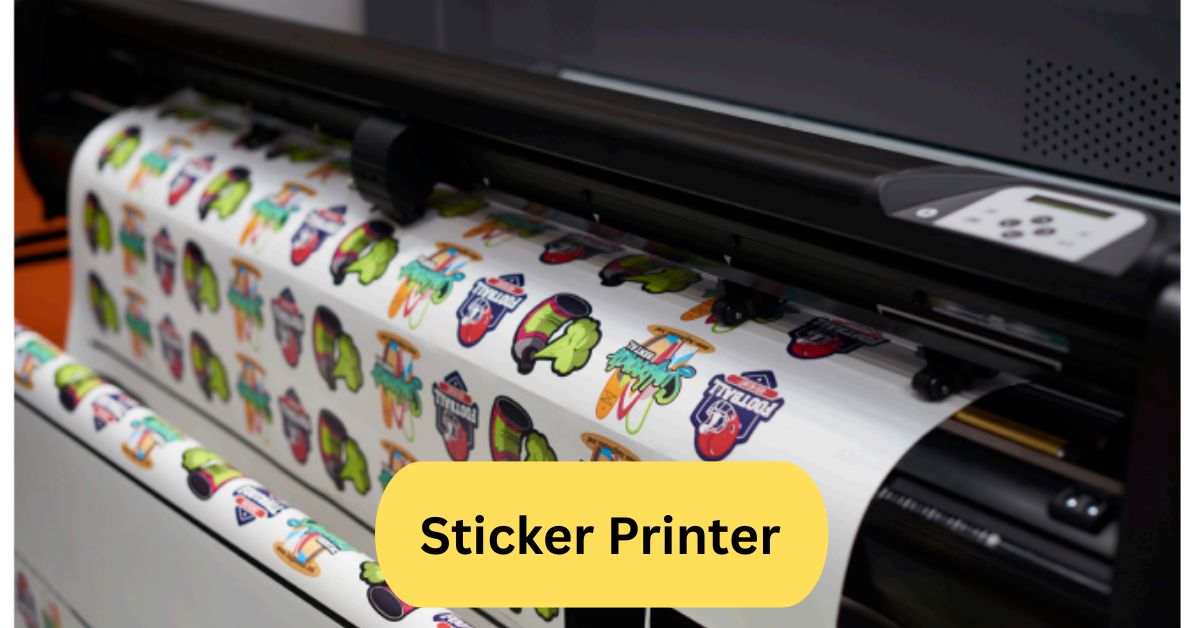
A sticker printer and cutter is an integrated device that can both print your designs onto sticker media (vinyl, adhesive paper, etc.) and automatically cut them—often using a built-in blade or plotter head. It’s ideal for small businesses or hobbyists because it streamlines the workflow (print → cut) in one pass. For best results, choose one with good precision, support for various media thicknesses, and software compatibility with your sticker layouts.
Vinyl sticker printer machine:
A vinyl sticker printer machine is a printer (often wide-format or eco/UV-solvent) specifically built to print high quality, durable stickers on vinyl material. It uses special inks (eco-solvent, UV-curable, or pigment) that resist water, fading, and weather, making them suitable for outdoor use.

These machines often have features like automatic roll feeders, built-in lamination, and precise cutting or contouring options to save time and improve finish. Good ones are an investment but essential for producing professional, long-lasting vinyl stickers.
Color sticker printer:
A color sticker printer is a device designed to print full-color graphics (using CMYK or more ink colours) directly onto sticker or label material, often including vinyl or glossy/satin paper. It should offer high resolution (at least ~1,200×600 dpi or more) for crisp, detailed designs and preferably support durable, water- and fade-resistant inks. Some advanced models also include built-in cutters or support roll media, which makes production more efficient for small businesses.
Frequently Asked Questions:
1. What kind of printer do I need to make stickers?
You ideally want an inkjet or laser printer that supports thicker media or specialty papers, with high resolution (300 dpi or more) so your designs come out sharp. For durability and color accuracy, pigment-based ink or eco-solvent printers are better for outdoor vinyl stickers.
2. How do I print my own vinyl stickers?
Design your sticker (ideally at 300 dpi), load printable vinyl or vinyl sticker sheets (adhesive side on correct face) into your printer, set paper type to “specialty” or “glossy,” print, optionally laminate for protection, then cut out using scissors or a cutting machine.
3. What is the best sticker printer and cutter for small business?
Compact print-and-cut models like the Roland BN-20A or Roland VersaSTUDIO BN2 are popular for small businesses. The Uninet iColor 250 is another option combining printing and cutting in one unit.
4. Is printing stickers profitable?
Yes, it can be—especially if you manage costs (vinyl, ink, labor) and sell to niche markets (decor, planners, custom labels). Margins improve when scaling, using efficient workflows, and offering value-added finishes like lamination or die cuts.
5. Can Cricut make stickers?
Yes — with a Cricut or similar cutting machine, you can print your designs on sticker paper then use the Cricut to cut precise shapes and outlines (print-then-cut method).
6. Can I use my regular printer to print stickers?
Yes, many standard inkjet or laser printers can print on sticker paper, as long as the material is compatible with your printer’s paper handling and heat (for laser). But results improve with higher quality, specialty printers.
7. Can I make stickers with Canva?
Yes — Canva lets you design stickers (shapes, graphics, text) and export in formats like PNG or PDF, which you can then print on sticker paper and cut out.
8. Can every printer print on sticker paper?
Not necessarily. It depends on the printer’s ability to handle thicker or specialty media and whether the sticker paper tolerates heat (especially for laser printers). Always check the printer’s spec and the paper’s recommended printer types.
9. Can I print stickers at Staples?
Yes — many print shops like Staples offer custom sticker or label printing services from your design file, often with options for lamination, cutting, different materials, and finishes.
10. How to make stickers at home?
Get printable vinyl or sticker sheets, design on software (e.g. Canva or Photoshop), print on your printer with correct settings, add laminate if desired, and cut either by hand (scissors or craft knife) or with a cutting machine (Cricut, Silhouette).
Conclusion:
Sticker printers have made it easier than ever to bring creativity and customization into everyday life. Whether you’re printing fun designs for personal use or launching a small sticker business, the right printer can deliver professional-quality results from the comfort of your home. With options ranging from compact inkjets to advanced vinyl machines, there’s a model for every need and budget. By choosing the right materials and maintaining your printer well, you can produce vibrant, durable stickers that truly stand out. Sticker printing isn’t just practical—it’s a fun and rewarding way to express your creativity.
About the Author