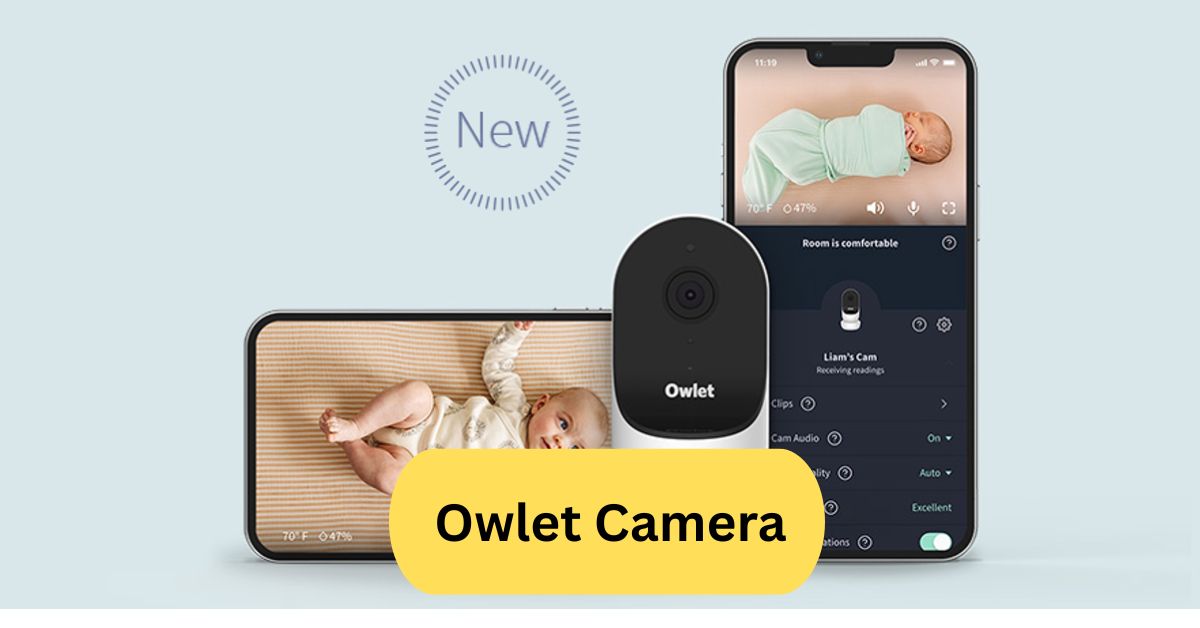
I’ve used the Owlet camera for my baby, and the clear video and night vision make it easy to check in, even in the dark. The two-way audio is great for soothing my little one, and I love being able to monitor the room temperature right from my phone.
The Owlet camera is a smart baby monitor that streams HD video with night vision, two-way audio, and room temperature monitoring. It pairs with the Owlet app, letting parents watch over their baby in real time from anywhere.
In this article we discuss about “Owlet Camera”
Table of Contents
Owlet Camera – The Complete 2025 Guide:
Introduction to Owlet Camera:
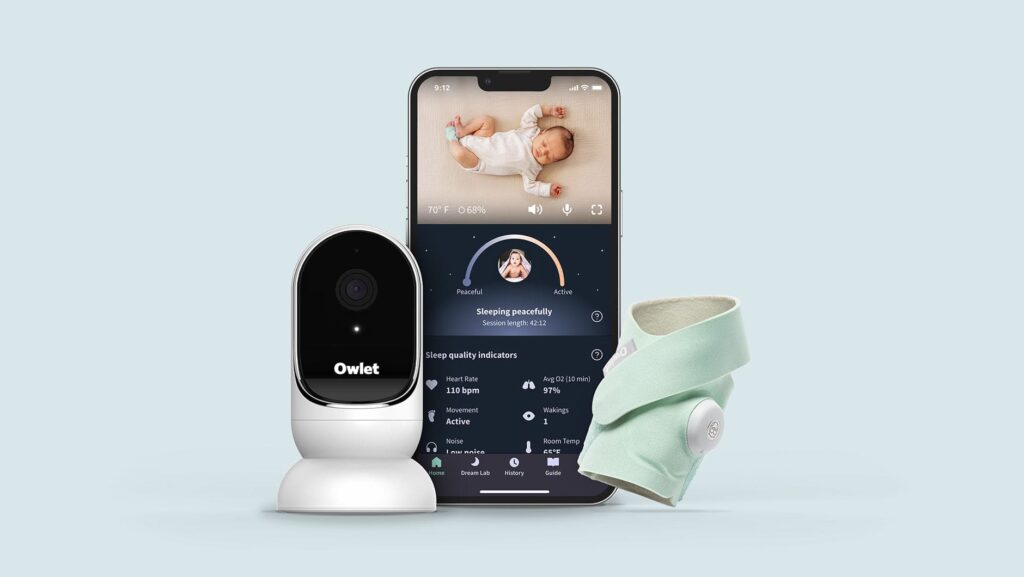
The Owlet Camera is a smart baby monitor designed to give parents peace of mind by providing real-time HD video and audio streaming from their child’s nursery directly to their smartphone. With features like encrypted streaming, two-way talk, night vision, and integration with the Owlet Dream Sock, it has become a trusted tool for modern parenting.
This article will cover everything you need to know about the Owlet Camera — from setup and features to troubleshooting and expert parenting tips.
Why Parents Love the Owlet Camera:
Parents appreciate the Owlet Camera because it combines safety, convenience, and advanced technology. Instead of relying on outdated audio-only monitors, the Owlet gives you crystal-clear visuals and important sleep insights in one device.
Key Reasons Parents Choose Owlet:
- Peace of mind: Live HD video anytime.
- Secure streaming: End-to-end encryption for privacy.
- Health tracking: Works with Dream Sock for heart rate & oxygen monitoring.
- User-friendly app: Intuitive interface for all ages.
- Long-term usability: Can be used beyond infancy for toddler monitoring.
Main Features of the Owlet Camera:
The Owlet Camera is packed with features designed for both newborn care and ongoing toddler safety.
1. Video Quality:
- Streams in 1080p HD resolution with 4x zoom.
- Adjustable viewing angle for better coverage.
2. Night Vision:
- In low light, you can see your infant clearly thanks to infrared LEDs.
- Gentle brightness to avoid disturbing sleep.
3. Two-Way Audio:
- Talk to your baby remotely to soothe them.
- Hear every sound in the nursery in real-time.
4. Secure Wi-Fi Streaming:
- Uses AES 128-bit encryption.
- Private connection — only authorized devices can view the feed.
5. Room Environment Tracking:
- Monitors temperature and humidity.
- Alerts if conditions fall outside the optimal range.
6. Owlet App Integration:
- Works on both iOS and Android.
- Stores snapshots and sleep trends.
How the Owlet Camera Works:
The Owlet Camera connects to your home Wi-Fi network and pairs with the Owlet app on your smartphone. Once set up, you can watch your child from anywhere — whether you’re in the next room or across the world.
Step-by-Step Function:
- Camera Setup: Mount on the wall or place on a flat surface.
- Connect to Wi-Fi: Use the app to pair.
- Secure Stream: Video/audio data is encrypted.
- App Control: View live feed, Zoom, talk, or check sleep stats.
- Alerts: Get push notifications for sound, motion, or environmental changes.
Setting Up Your Owlet Camera:
1. Unboxing:
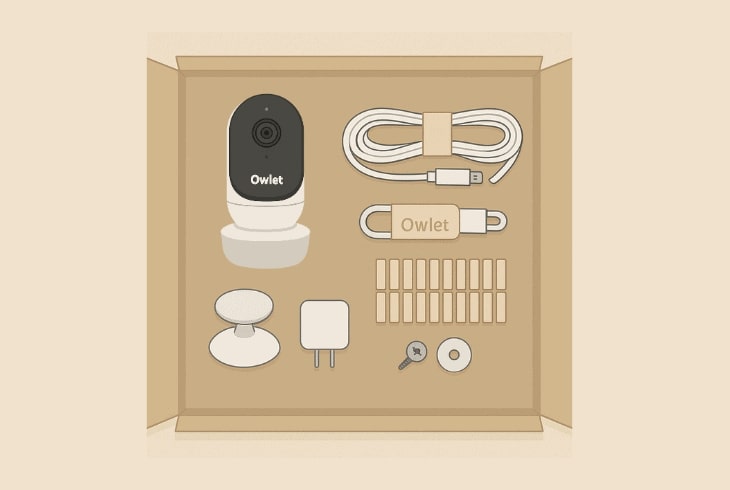
When you open your Owlet Camera box, you’ll find:
- Owlet Camera unit
- Magnetic base
- Wall mounting kit
- Power cable and adapter
- Quick start guide
2. Installation:
- Choose a spot that gives a full crib view.
- In low light, you can see your infant clearly thanks to infrared LEDs.
- Hide cables with the included kit.
3. App Pairing:
- Download the Owlet app.
- Follow on-screen prompts to connect to Wi-Fi.
- Test audio and video before finalizing the setup.
Benefits of the Owlet Camera:
1. Peace of Mind for Parents:
- Constant connection with your child’s environment.
- Alerts for unusual sounds or environmental changes.
2. Better Sleep Tracking:
- Integration with Dream Sock gives health stats.
- Helps you understand sleep patterns.
3. Portability:
- Can be relocated easily for travel.
4. Long-Term Value:
- Useful for toddlers, older kids, and even pets.
Owlet Camera vs. Traditional Baby Monitors:
| Feature | Owlet Camera | Traditional Monitor |
| Video Quality | 1080p HD | 480p or lower |
| Remote Viewing | Yes (app-based) | Limited (radio range) |
| Health Tracking | Yes (with Dream Sock) | No |
| Alerts | Push notifications | Audio alerts only |
| Security | Encrypted | Varies |
Pros & Cons:
1. Pros:
- High-quality HD video
- Secure, private streaming
- Temperature & humidity monitoring
- Works with other Owlet products
- Portable and easy to install
2. Cons:
- Requires Wi-Fi connection
- Higher price than basic monitors
- Dependent on smartphone use
Troubleshooting Common Issues:
1. Connection Problems:
- Restart the router and camera.
- Ensure your Wi-Fi is 2.4GHz (not just 5GHz).
2. Video Lag:
- Close background apps on your phone.
- Improve Wi-Fi signal strength.
3. No Audio:
- Check app settings for microphone access.
- Modifica el nivel de sonido tanto en la app como en el teléfono.
Owlet Camera Safety Tips:
- Always mount out of a baby’s reach.
- Use the included cable covers.
- Keep Wi-Fi password strong for security.
- Regularly check firmware updates.
Best Alternatives to Owlet Camera:
If you’re looking for similar devices, consider:
- Nanit Pro
- Miku Pro
- Infant Optics DXR-8 Pro
- HelloBaby Monitor
Owlet Cam 2 – Smart Baby Monitor Camera:
The Owlet Cam 2 – Smart Baby Monitor Camera offers HD video streaming with night vision, two-way audio, and room temperature monitoring. It works with the Owlet app, letting parents watch, hear, and talk to their baby from anywhere.
Owlet camera review:
The Owlet Camera proporciona nítido HD video, fiable night vision, y audio de dos vías, lo que facilita la supervisión de tu bebé durante el día y la noche. Numerosos padres aprecian su integración con apps, aunque algunos señalan problemas de connectivity a veces.
Owlet camera setup:
Setting up the Owlet Camera is simple—download the Owlet app, connect the camera to Wi-Fi, and follow the in-app instructions. Mount or place it where you want, and you’re ready to monitor your baby in minutes.
Owlet® Cam:
The Owlet® Cam is a smart baby monitor that streams HD video with night vision and two-way audio through the Owlet app. It also tracks room temperature, helping parents keep their baby safe and comfortable.
Frequently Asked Questions:
1. Why is Owlet being discontinued?
Owlet’s Smart Sock was discontinued in the U.S. due to FDA regulatory concerns, but the camera and other products are still available.
2. Why are pediatricians against Owlet?
Some pediatricians worry it may cause unnecessary anxiety, as it’s not FDA-approved to diagnose or prevent medical conditions.
3. What does an Owlet camera do?
It streams HD video with night vision, two-way audio, and room temperature monitoring via the Owlet app.
4. Does the Owlet camera need WiFi?
Yes, it requires a WiFi connection to stream video and send alerts to your phone.
5. Does Owlet still work if WiFi goes out?
No, live streaming and app notifications won’t work without WiFi.
6. Can you talk to your baby through the Owlet camera?
Yes, it has two-way audio so you can hear and speak to your baby remotely.
7. Will Owlet alert me if the baby stops breathing?
Only the Owlet Dream Sock monitors breathing patterns—not the camera alone.
8. Can Owlet prevent SIDS?
No, Owlet cannot prevent SIDS; it’s a monitoring tool, not a medical device.
9. Does the Owlet camera alert you when a baby cries?
Yes, it can send sound alerts when your baby cries or makes noise.
10. How does the Owlet know if the baby is in deep sleep?
The Owlet Dream Sock tracks movement and oxygen levels to estimate sleep stages, viewable in the app.
Conclusion:
The Owlet Camera is a reliable, feature-rich baby monitor that gives parents peace of mind with its HD video, night vision, two-way audio, and room environment tracking. Its secure app integration allows real-time monitoring from anywhere, making it a valuable tool for modern parenting. While it requires Wi-Fi and comes at a higher price than basic monitors, its advanced features and compatibility with the Owlet Dream Sock make it worth the investment. Overall, it’s a smart choice for families seeking both safety and convenience in one device.
About the Author





